Journey
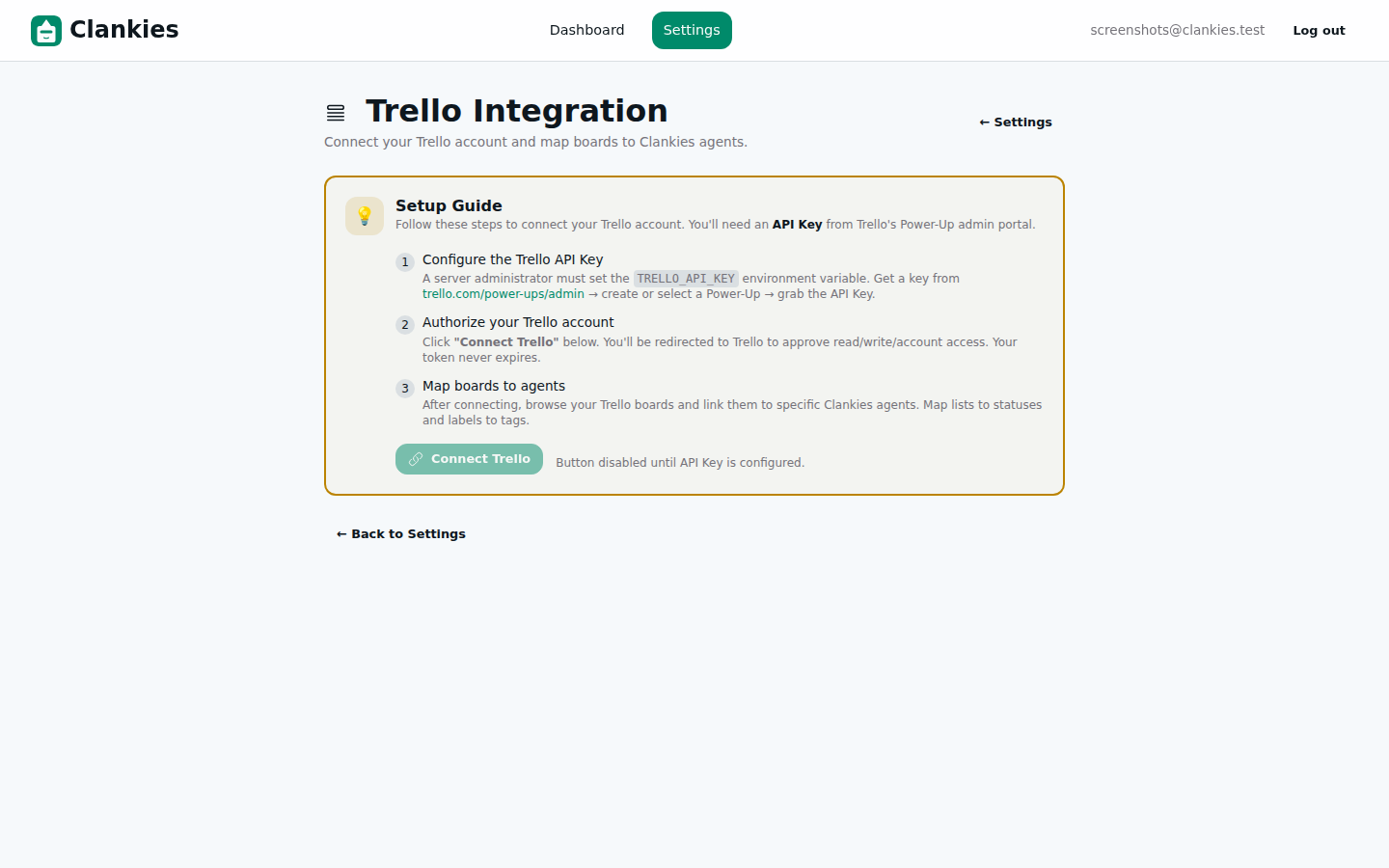 From here, users navigate to Settings → Integrations → Trello to configure the integration.
The Trello Power-Up integration was designed on paper in ADR-004 — a three-layer architecture with OAuth, webhooks, and a Power-Up behaviour module. The backend was built. The tests were written. But without a user interface, none of it was usable.
This slice bridges that gap. The Trello integration now has a real configuration page — a polished LiveView with a three-step wizard that walks users through connecting their Trello account, browsing their boards, and mapping them to Clankies agents. From “I want to connect Trello” to “my agent is watching a board” is now a handful of clicks.
We also fixed two important bugs uncovered during the UI build: the API client now handles both keyword-list and map-style params (it previously crashed on map params), and the webhook verification endpoint was changed from HEAD to GET for broader compatibility with Trello’s callback system.
What Changed
1. The Trello Integration Configuration Page
The centerpiece of this slice: a full LiveView at /settings/trello with a 3-step wizard that guides users through the entire Trello setup process.
Step 1 — Connect your Trello account: A card showing the user’s connection status with a prominent “Connect Trello” button. Clicking it redirects to Trello’s authorization page (trello.com/1/authorize). After approval, Trello redirects back with a token, which Clankies validates against the Trello API (GET /1/members/me) and stores securely. Disconnecting is a single click, which also deregisters all webhooks and cleans up board mappings.
Step 2 — Browse and map boards: Once connected, Clankies fetches the user’s Trello boards and displays them in a responsive grid (2-column on desktop, 1-column on mobile). Each board card shows its name and whether it’s already mapped. A search input with 150ms debounce filters boards in real-time. Clicking a board opens a mapping form with an agent selector dropdown — choose which Clankies agent should monitor that board, then hit “Map Board.” A green confirmation card pulses briefly to signal success.
Step 3 — How it works: A three-card explainer (Connect → Map → Automate) so users understand what they just set up.
# The heart of the mapping flow
def handle_event("map_board", _params, socket) do
  user = socket.assigns.current_scope.user
  board_id = socket.assigns.map_board_id
  agent_id = socket.assigns.map_agent_id

  case Trello.create_board_mapping(user.id, %{
         trello_board_id: board_id,
         trello_connection_id: socket.assigns.connection.id,
         agent_id: agent_id
       }) do
    {:ok, _mapping} ->
      # Show confirmation animation
      {:noreply, assign(socket, :mapped_confirmation, %{
        board_name: board_name,
        agent_name: agent.name
      })}

    {:error, %Ecto.Changeset{} = changeset} ->
      {:noreply, put_flash(:error, "Validation error")}

    {:error, reason} when is_binary(reason) ->
      {:noreply, put_flash(:error, "API error: #{reason}")}
  end
end
2. API Client Improvements
The ApiClient.request/4 function now handles both keyword-list and map-style parameters, so consumers can pass either without crashing:
all_params =
  case params do
    list when is_list(list) ->
      Keyword.merge(list, key: api_key, token: trello_connection.access_token)
    map when is_map(map) ->
      Map.merge(map, %{key: api_key, token: trello_connection.access_token})
  end
Additionally, the client now supports a test-mode plug injection (:trello_test_plug application config), allowing test suites to stub Trello API responses via a local Plug instead of hitting the real API. This dramatically improves test reliability.
3. Router Fix: Webhook Verification
The Trello webhook verification endpoint was changed from HEAD /api/trello/webhook to GET /api/trello/webhook. Trello’s webhook registration flow sends a HEAD request to verify the callback URL, but some Trello API versions behave differently. The GET route is more broadly compatible.
4. Error Handling Polish
The TrelloApiController gained a new error handler for the case where Trello is not connected at all (returns a clear 401 with a descriptive message instead of crashing). The TrelloSettingsLive map_board handler now gracefully catches both {:error, %Ecto.Changeset{}} and {:error, reason} when reason is a string — previously it crashed on the latter.
5. CSS Confirmation Animation
A subtle pulse-once keyframe animation gives the board mapping confirmation card a gentle visual pop — two beats of a 1.02x scale that draws the user’s eye without being distracting:
@keyframes pulse-once {
  0%, 100% { transform: scale(1); }
  50% { transform: scale(1.02); }
}
.animate-pulse-once {
  animation: pulse-once 0.6s ease-in-out 2;
}
Architecture
The Trello integration now has a complete user-facing configuration layer on top of the backend built in Slice 02. Here’s the full OAuth + board mapping flow:
sequenceDiagram
    actor User
    participant LiveView as TrelloSettingsLive
    participant Controller as TrelloController
    participant Trello as Trello API
    participant DB as Database

    User->>LiveView: Click "Connect Trello"
    LiveView->>Controller: GET /integrations/trello/authorize
    Controller->>User: 302 Redirect to trello.com/1/authorize
    User->>Trello: Approve authorization
    Trello->>User: 302 Redirect with ?token=XXXX
    User->>Controller: GET /integrations/trello/callback?token=***
    Controller->>Trello: GET /1/members/me (validate token)
    Trello-->>Controller: {id, username}
    Controller->>DB: Upsert TrelloConnection
    Controller->>User: 302 to Settings + flash

    User->>LiveView: Click "Browse Trello Boards"
    LiveView->>Trello: GET /1/members/me/boards
    Trello-->>LiveView: [{id, name, url, closed}]
    LiveView->>LiveView: Filter open boards
    LiveView-->>User: Board grid

    User->>LiveView: Select board → pick agent
    LiveView->>DB: Create TrelloBoardMapping
    LiveView->>Trello: POST /1/webhooks (register)
    Trello-->>LiveView: {id: webhook_id}
    LiveView->>DB: Store webhook_id on mapping
    LiveView-->>User: ✅ Confirmation animation
The three key architectural layers are:
| Layer | Module | Responsibility |
|---|---|---|
| UI | ClankiesWeb.TrelloSettingsLive |
3-step wizard, board grid, agent selector |
| Auth | Clankies.Trello.Auth + TrelloController |
OAuth token exchange, validation via Trello API |
| Mapping | Clankies.Trello context + TrelloBoardMapping schema |
Board-to-agent mapping, webhook registration |
Debugging
The board selection UI hit a significant blocker during development that was decomposed into vertical slices:
| Bug | Symptom | Root Cause | Fix |
|---|---|---|---|
| map_board crash on webhook failure | LiveView crashed when webhook registration returned 404 | Trello.create_board_mapping/2 returns {:error, "string"} but handler only matched {:error, %Ecto.Changeset{}} |
Added {:error, reason} pattern match with user-friendly flash message |
| CSS selector with embedded quotes | Test assertion div:fl-contains("Map \\"Ideas Board\\" to an agent") broke the CSS parser |
Escaped double quotes in fl-contains selector are invalid CSS |
Regex assertion ~r/Map.*Ideas Board.*to an agent/ |
| Unused variable warnings | 5 test warnings for unused agent variables |
Variables created via agent_fixture() but never referenced in assertions |
Prefix with underscore |
Technical Decisions
| Decision | Rationale | Trade-offs |
|---|---|---|
| 3-step wizard UX | Guides users through a multi-step setup without overwhelming them | More page real estate than a single form; requires managing wizard state in LiveView assigns |
| ETS-based webhook dedup | Simple, fast, avoids DB queries for the common case | State lost on app restart; 5-minute TTL window is arbitrary but sufficient for Trello’s at-least-once delivery |
| API Key + Token first | Simplest auth flow; token never expires by default | OAuth 1.0a users get a less polished experience until the refresh flow is added |
| Test plug injection via app config | Clean separation — tests don’t need a running mock server | Slight coupling between test config and production code path |
| Pulse-once animation | Draws attention to the mapping confirmation without being intrusive | Pure CSS, no JS — degrades gracefully on older browsers |
What We Learned
- LiveView wizard state is elegant but requires discipline. The 3-step flow uses LiveView assigns (connection, boards, map_board_id, mapped_confirmation) to track progress — but forgetting to reset one assign on transition causes visible bugs. A state machine pattern (custom
:fsmfield) would scale better for more complex flows. - Error handler exhaustion is a real pattern. The “iteration budget exhausted” blocker forced us to decompose the board selection UI into two vertical slices (fix tests first, polish UX second) — validating the project’s vertical-slice decomposition strategy.
- Trello API inconsistencies are real. The webhook verification endpoint (
HEADvsGET) varies depending on Trello API version. Supporting both is safer.
What’s Next
The Trello board selection UI is in review with two child tasks ready for the flash agent: Slice 1a (fix 8 failing LiveView tests) and Slice 1b (polish board loading UX with refresh button, error recovery, empty state, and skeleton loading). After that, the final task is building the list/label mapping UI and end-to-end testing.