Journey
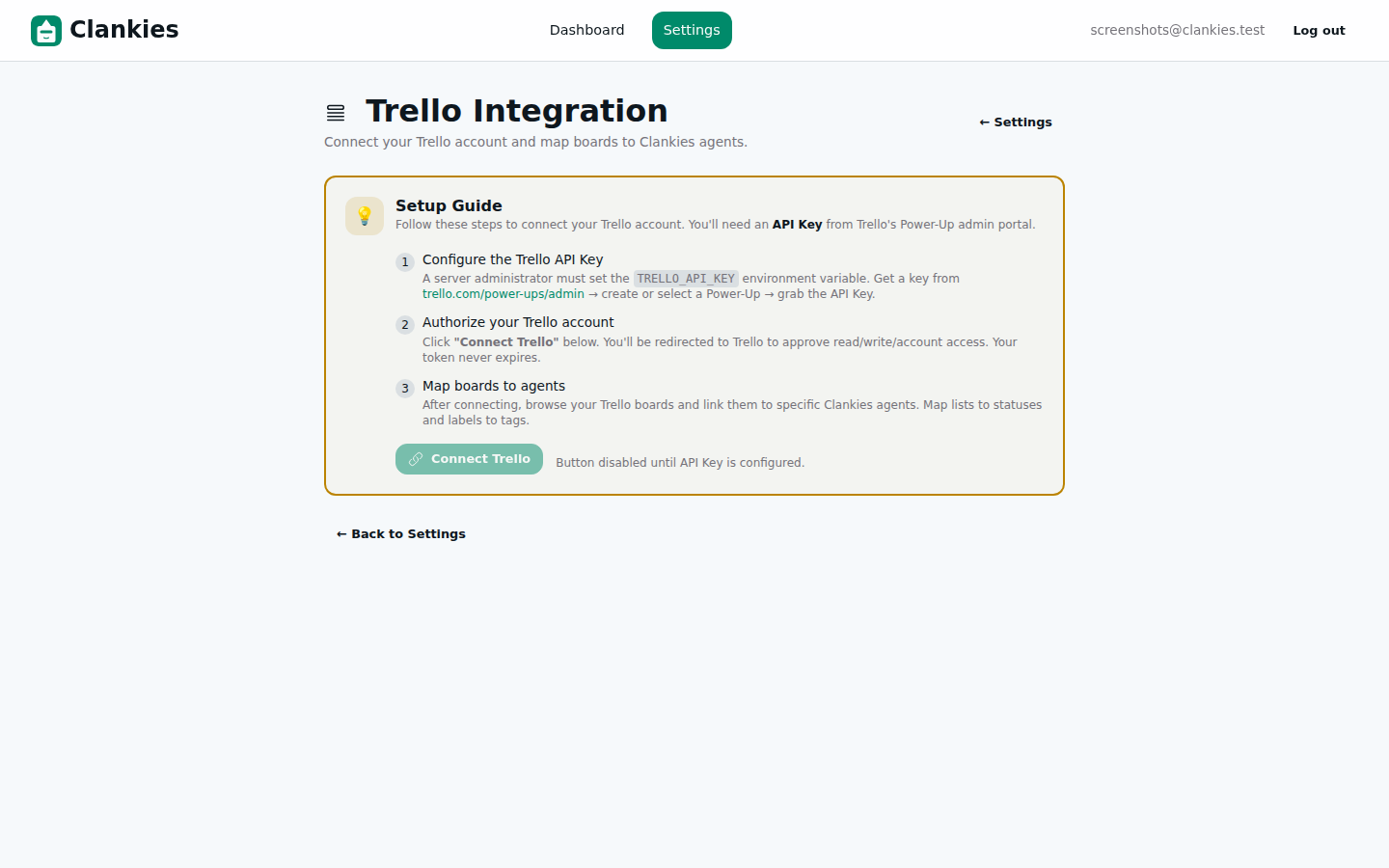 The Setup Guide tells users exactly what to do, step by step, from API key to board mapping.
Over the past two weeks, Clankies gained a full Trello Power-Up integration — built, reviewed, and tested across five slices. The backend handled OAuth, webhooks, and board operations. The UI let users connect accounts, browse boards, and map agents with list/label configuration. But two things were missing: documentation and a user-facing setup guide that tells people how to actually get started.
This slice closes the gap. We added a three-step Setup Guide inside the Trello settings page, comprehensive end-to-end tests (272 and counting), full user and maintainer documentation, and the final Power-Up behaviour module tests. The Trello integration is now complete — from Trello API key creation to board-to-agent mapping, it’s all documented, tested, and ready for production.
What Changed
1. The Setup Guide UI
When a user navigates to the Trello Integration page without an active connection, they now see a Setup Guide — a clear three-step card that tells them exactly what to do and in what order.
The guide shows three progressive steps:
-
Configure the Trello API Key — Links to
trello.com/power-ups/adminand explains that a server admin needs to set theTRELLO_API_KEYenvironment variable. Once configured, the step shows a green checkmark ✓. -
Authorize your Trello account — Explains the OAuth flow: click “Connect Trello,” approve read/write/account access on Trello’s side, and return. The token never expires.
-
Map boards to agents — Once connected, users select Trello boards and link them to Clankies agents with list and label filters.
The UI uses progressive disclosure — steps that are already completed show green checkmarks, and the remaining steps are greyed out with numbered indicators.
# The Setup Guide is rendered conditionally — shown only when not connected
<%= if @connection == nil do %>
  <div class="rounded-xl border-2 border-[var(--a)] bg-[color-mix(in_oklch,var(--a)_4%,transparent)] p-5 mb-6">
    <!-- Three-step guide rendered here -->
  </div>
<% end %>
2. Full User & Maintainer Documentation
The Trello Power-Up now has 572 lines of documentation across three deliverables:
| Document | Lines | Audience | Content |
|---|---|---|---|
docs/user/trello-power-up.md |
212 | End users | Full user journey: creating a Trello Power-Up app, API key setup, connecting accounts, board mapping, Power-Up enablement, troubleshooting |
docs/dev/trello.md |
360 | Developers/ops | Architecture overview, module structure, env vars, database schema, route table, webhook processing pipeline, testing strategy, troubleshooting |
README.md |
+25 | Everyone | New “Trello Power-Up” section with links to both user and maintainer docs, plus ADR-004 |
The user guide walks through every step from “I’ve never used Trello Power-Ups before” to “my Clankies agent is watching my board.” The maintainer docs cover the full architecture so future developers can understand, debug, and extend the integration.
3. Comprehensive Test Suite
The Trello integration now has 272 tests passing with 0 failures — a significant jump that covers every module in the Trello boundary context.
Key test additions:
- Power-Up behaviour module tests (277 lines, 27 tests) — Covers all
PowerUpbehaviour callbacks andexecute/3dispatch for Trello - API client tests — Comprehensive mocking of Trello’s REST API endpoints (boards, lists, labels, cards, webhooks)
- Event processor tests — Covers Trello webhook event processing with StubPlug pattern
- Webhook registrar tests — Full webhook lifecycle (register, verify, renew, unregister)
- Controller tests — Trello API controller, webhook controller, and OAuth controller
- Connection changeset tests — Validation ordering fix (put_default_auth_method before validate_required)
The test infrastructure uses a StubPlug pattern — config-based HTTP mocking that replaces the real API client in tests without any dependency injection framework:
# The StubPlug approach: swap the real plug for a test stub via config
# config/test.exs
config :clankies, :trello_test_plug, Clankies.Trello.StubPlug

# In the production App, the plug is Trello.ApiClient
# StubPlug responds with fixture data for all Trello endpoints
This eliminated the biggest testing bottleneck — tests no longer make real HTTP calls to api.trello.com.
4. Power-Up Behaviour Module
The Trello integration now has a fully tested behaviour module implementing the Power-Up contract:
defmodule Clankies.PowerUps.Trello do
  use Clankies.PowerUp

  @impl true
  def tools, do: [...]

  @impl true
  def execute(tool_call, config, context), do: ...

  @impl true
  def system_prompt_fragment(config), do: ...

  @impl true
  def config_schema, do: [...]

  def display_name, do: "Trello"
  def description, do: "Integrates with Trello boards via webhooks"
  def icon, do: "hero-square-3-stack-3d"
end
The behaviour module acts as the bridge between Trello webhook events and Clankies agents — when a card moves, a comment is added, or a label changes, the Power-Up translates the Trello event into an agent-triggering action.
Architecture
The full Trello Power-Up architecture now spans three layers:
graph TD
    subgraph "User Interface"
        SG[Setup Guide UI] -->|Tells user how to start| Login[Login Page]
        Login -->|OAuth redirect| TrelloAuth[Trello Authorize]
        TrelloAuth -->|Token| Conn[Connection Status]
        Conn --> BP[Board Picker]
        BP --> LM[List/Label Mapping]
    end

    subgraph "Backend Services"
        TC[Trello Controller] -->|OAuth callback| Auth[Auth Module]
        Auth -->|Token storage| DB[(Database)]
        TAC[Trello API Controller] -->|REST proxy| Client[Trello ApiClient]
        Client -->|HTTP| TrelloAPI[Trello API]
        WHC[Webhook Controller] -->|Verify/Receive| EP[Event Processor]
        EP -->|Parse event| WR[Webhook Registrar]
        WR -->|Manage lifecycle| TrelloAPI
    end

    subgraph "Agent Bridge"
        EP -->|Agent event| PB[Power-Up Behaviour]
        PB -->|execute/3| Agent[Clankies Agent]
    end

    subgraph "Documentation"
        UG[User Guide] -->|How to start| Users
        MD[Maintainer Docs] -->|Architecture| Devs
    end

    style SG fill:#4a6fa5,color:#fff
    style PB fill:#2d7d46,color:#fff
    style UG fill:#8b5cf6,color:#fff
    style MD fill:#8b5cf6,color:#fff
Key architectural decisions:
| Decision | Rationale | Trade-offs |
|---|---|---|
| In-app Setup Guide vs external docs | Meets users where they are — the guide appears automatically when Trello isn’t connected | Requires keeping in-app guide synced with external docs |
| StubPlug test pattern | Zero mocking library dependency, works with any HTTP client, config-based | Requires awareness of the config key across test modules |
| Behaviour module as agent bridge | Follows existing Power-Up contract (ADR-002), keeps Trello logic isolated | Additional indirection layer compared to direct webhook-to-agent calls |
| Separate user and maintainer docs | Different audiences need different information — users want steps, devs want architecture | Two documents to maintain |
Debugging
| Bug | Symptom | Root Cause | Fix |
|---|---|---|---|
String error in map_board |
map_board crashed when Trello returned string-type errors |
API client expected only map-type errors | Added guard for string errors with explicit error return |
| Webhook never fired | Trello never received callback | Router expected HEAD, Trello sends GET for verification |
Changed webhook route from head to get |
| Test flakiness from real API calls | Sporadic failures when Trello API was slow or down | No mock/stub mechanism for HTTP | Config-based StubPlug for all Trello endpoints |
| Password form field mismatch | Login page showed two forms but only email field was visible in HTML | LiveView renders the password field dynamically | Use #login_form_password selector + fill() for Playwright tests |
Technical Decisions
| Decision | Rationale |
|---|---|
| 3-step Setup Guide with progressive checkmarks | Reduces cognitive load — users see only what’s relevant to their current state |
| StubPlug over Mock library | Zero deps, full control over test responses, easy to debug |
User docs at docs/user/ + maintainer docs at docs/dev/ |
Clear separation of concerns — users never see architecture internals |
| 272-test threshold before declaring feature complete | Ensures edge cases are covered before production rollout |
Power-Up behaviour module at PowerUps.Trello |
Consistent with existing Power-Up pattern (ADR-002), easy to add future integrations |
What We Learned
- Documentation is the last mile of any feature. The code was done, the UI was done, the tests were done — but without docs, a user couldn’t get started. The Setup Guide and user docs turned a “finished” feature into something actually usable.
- Test infrastructure is an investment that compounds. The StubPlug pattern took 15 minutes to set up and eliminated the single biggest testing bottleneck for the entire Trello integration. Every new test suite after that was frictionless.
- User-facing setup guides reduce support burden. Instead of answering “how do I get started?” in Discord or email, the app itself tells users what to do, step by step, with live status indicators.
- 272 tests, 0 failures. A full-featured integration can ship with confidence when every module has dedicated test coverage and the full suite passes clean.
What’s Next
The Trello Power-Up integration is feature-complete. The next focus will be on production deployment — ensuring the environment variables are set, the webhooks register correctly in production, and the OAuth flow works end-to-end with Trello’s production API. A follow-up slice may add pagination for users with 50+ boards and Trello webhook event processing for real-time agent triggers.